Claude Code Manager
A vibe-coded control panel that brings a sprawling AI-assisted authoring toolchain—agents, skills, MCP servers, memory, and hooks—into one local dashboard, keeping a fast-growing set of documentation-automation workflows organized, consistent, and easy to maintain across daily UA work.
Context#
Claude Code is powerful, but its configuration lives in a tangle of JSON and Markdown files scattered across ~/.claude/. As an AI-assisted authoring setup grows—more MCP servers, more agents, per-project skills, memory files for different codebases—editing those files by hand becomes slow and error-prone. There is no built-in way to see everything at once, no single place to toggle a server on or off, and no overview of which agents exist or which skills are loaded.
For daily UA work, this friction had a direct cost: as I built up a serious configuration to automate documentation tasks, the growing number of skills and MCP tools became hard to manage, leading to inconsistent output quality and a slower workflow.
My Role#
I designed and built Claude Code Manager (CCM) end to end using vibe coding—a local web app that reads and writes the ~/.claude/ ecosystem directly through a Node.js and Express server, with a dependency-free vanilla frontend. Beyond the tool itself, I designed and built a set of skills targeting different stages of daily UA work and automated repetitive tasks across the documentation workflow, so the whole authoring toolchain could be governed from one place.
Key Challenges#
- Configuration was fragmented across
~/.claude.json,settings.json, andsettings.local.json, each owning a different slice (MCP servers, plugins, hooks, env vars) with no unified view. - Agents, skills, memory, MCP servers, hooks, and plugins each followed different formats and file layouts—including both flat-file and directory-based skills—that had to be read and written correctly.
- Edits go straight to disk with no undo, so every write had to be safe: paths validated against traversal, writes made atomic, and sensitive values kept out of logs.
- The tool had to stay strictly local and non-destructive—binding only to
127.0.0.1, disabling servers via a list rather than deleting their config, and surfacing plugin install commands as copyable blocks instead of running them.
Deliverables#
- A single local dashboard covering agents, skills, memory, MCP servers, plugins, hooks, rules, and settings—each editable through purpose-built forms rather than raw JSON.
- Full MCP lifecycle management: list, add, edit, enable/disable, per-project overrides, reachability probes, and a batch connectivity check.
- A set of custom skills mapped to different stages of the UA workflow, plus automation of recurring authoring tasks.
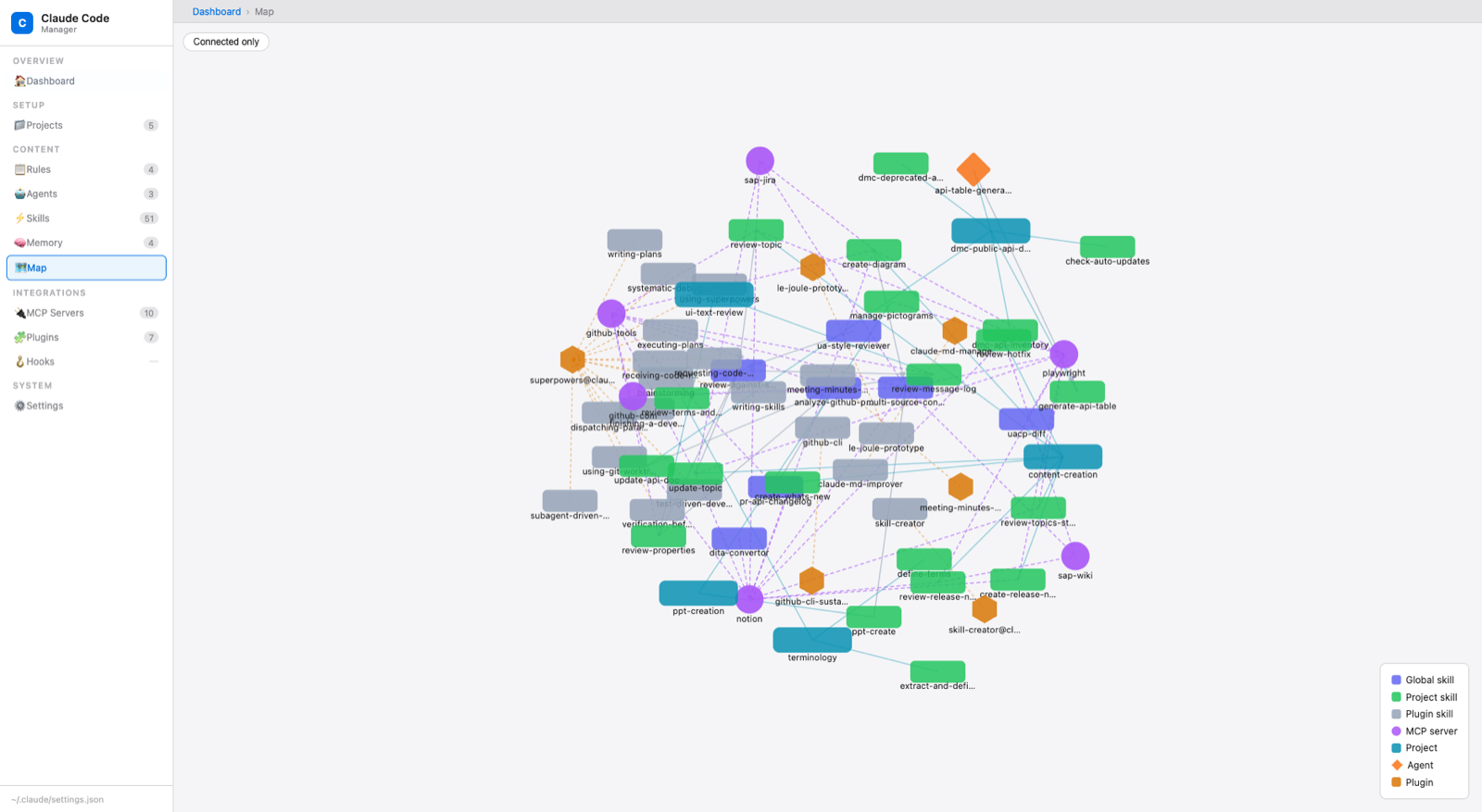
- An interactive dependency map visualizing how MCP servers and agents relate, and a dashboard with at-a-glance counts and a recent-activity feed.
Impact & Business Value#
- Skills and tools are now properly allocated and easy to manage, replacing manual file-hunting with a single control panel.
- The overall efficiency and quality of daily UA work improved as configuration drift and setup errors dropped.
- Work history is archived and available for later review and analysis, giving the automation setup a durable, inspectable state.
- Lowered the barrier for the broader UA team to adopt and maintain AI-assisted documentation workflows at scale.